ESP32
Espressif Wi-Fi/BLE SoC family. Boots from external flash, stores secrets in NVS, and ships with Secure Boot, Flash Encryption, and eFuses that are usually left off.
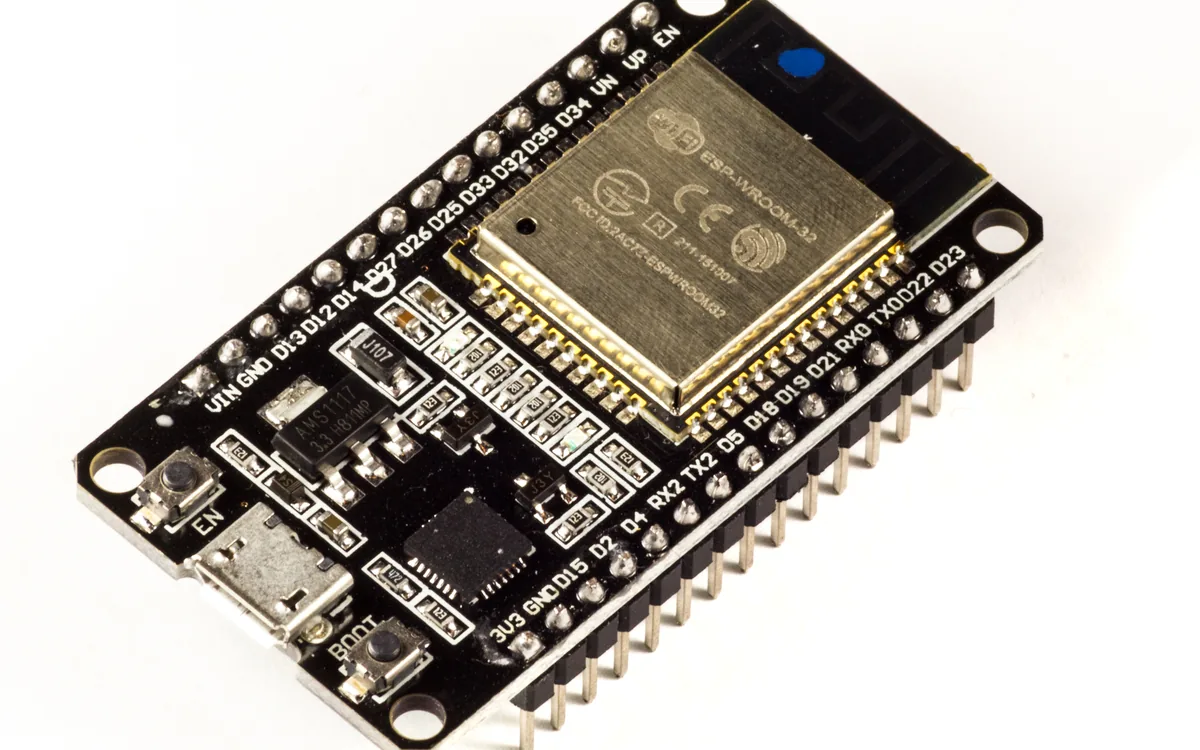
The ESP32 is a family of low-cost Espressif systems-on-chip that pair a microcontroller core with an integrated radio, usually Wi-Fi plus Bluetooth. Cheap, well-documented, and easy to program with ESP-IDF or Arduino, it is one of the most common brains inside smart plugs, cameras, sensors, locks, and other consumer IoT. When you open a connected device on the bench, an ESP32 module is one of the parts you are most likely to find.
What it is
The name covers several generations that differ in CPU core and radios:
| Chip | Core | Radios |
|---|---|---|
| ESP32 (original) | dual-core Xtensa LX6 | Wi-Fi 4, BT Classic + BLE |
| ESP32-S2 | single Xtensa LX7 | Wi-Fi 4, native USB |
| ESP32-S3 | dual Xtensa LX7 | Wi-Fi 4, BLE 5, native USB |
| ESP32-C3 | single-core RISC-V | Wi-Fi 4, BLE 5 |
| ESP32-C6 | RISC-V | Wi-Fi 6, BLE 5, 802.15.4 (Thread/Zigbee) |
The bare SoC almost never appears alone. It ships inside a shielded module, most often an ESP-WROOM-32 (SoC + external SPI flash + PCB antenna under a metal can) or an ESP32-WROVER (same, plus external PSRAM). A dev board such as the one pictured then adds a USB-UART bridge, a 3V3 regulator, the EN (reset) and BOOT (GPIO0) buttons, and broken-out headers. The flash chip that holds the firmware lives outside the SoC, inside the module can, which matters for both boot and attacks.
Why it matters
Two facts make the ESP32 a rewarding target. First, ubiquity: the same part is reused across countless products, so a technique learned on one board transfers to the next. Second, security is off by default. Secure Boot, Flash Encryption, and the JTAG-disable fuse all exist, but they are opt-in and must be explicitly enabled and burned in production. A large share of shipped devices leave them un-burned, which means the external flash is readable, the firmware is reversible, and the NVS credential store often hands over the Wi-Fi keys.
How it boots and stores
Reset hands control to the immutable first-stage bootloader in mask ROM. It reads a strapping pin (GPIO0/BOOT): held low it enters UART download mode and waits for a host to flash it; otherwise it loads the second-stage bootloader from external flash (0x1000 on the original ESP32, 0x0 on the S3/C-series). The second-stage bootloader reads the partition table at 0x8000, then loads and runs the selected application (the factory partition, or an ota_0/ota_1 slot chosen from the otadata partition).
The flash also carries the data partitions. NVS (Non-Volatile Storage) is the ESP-IDF key-value store, a data/nvs partition where firmware persists Wi-Fi SSIDs and PSKs, cloud tokens, and config across reboots. NVS is plaintext unless flash encryption or NVS encryption is turned on, so it is the first place to look after a dump. See the diagram for a representative layout; the real offsets come from the project's partitions.csv.
Security features
- Secure Boot v2 verifies an RSA-3072 (or ECDSA on newer parts) signature at each boot stage before running it. The public-key digest is burned into an eFuse block and cannot be changed afterwards, anchoring the chain of trust so only vendor-signed images run.
- Flash Encryption stores the off-chip flash as ciphertext under a key held in eFuse (AES-XTS on the S2/S3/C-series; a tweaked AES-256 scheme on the original ESP32). The flash controller decrypts transparently on fetch; the key never leaves the die and its read-back is disabled. A raw chip dump then yields only ciphertext.
- eFuses are one-time-programmable bits blown into silicon. They store the keys above and hold the irreversible policy bits: Secure Boot enable, Flash Encryption enable, download-mode restrictions, and JTAG disable, which permanently closes the hardware debug port.
Encryption and Secure Boot are normally deployed together: encryption stops the offline read, Secure Boot stops the offline write.
Attack surface and how to assess one
Start by reading the chip's security posture over UART download mode, then decide whether the offline paths are open.
# Identify the chip and the attached flash (put the board in download mode:
# hold BOOT/GPIO0 low, tap EN/reset, release BOOT).
esptool.py -p /dev/ttyUSB0 flash_id

# Read the security eFuses - this tells you which doors are still open.
espefuse.py -p /dev/ttyUSB0 summary

# If Flash Encryption is NOT burned, dump the whole flash for offline analysis.
esptool.py -p /dev/ttyUSB0 read_flash 0x0 0x400000 dump.bin
With dump.bin in hand, read the partition table, carve out the nvs partition, and parse it (nvs_partition_gen.py, esp32_nvs, or a plain strings pass) to recover Wi-Fi credentials and tokens. If espefuse.py summary shows Secure Boot, Flash Encryption, and JTAG all un-burned, the board is wide open: dump it, reverse the app, patch and reflash at will. If the fuses are burned, the offline paths close and you pivot to running-chip leaks, debug-interface misuse, or side-channel and fault-injection angles.
Pitfalls
- The flash is external to the SoC (inside the WROOM/WROVER can), so a physical read means getting at that chip; the easy path is
esptoolover UART, not a SOIC clip on the SoC itself. - Flash Encryption in development mode is not the same as release mode: it can still be re-flashable and is a common misconfiguration to check for.
- Burning a security eFuse is irreversible. On a real target you assess, never blindly write; on your own lab board, understand that a wrong burn bricks a path forever.
- The offsets in the diagram are an example. Always read the actual partition table from the target before assuming where NVS or the app lives.